


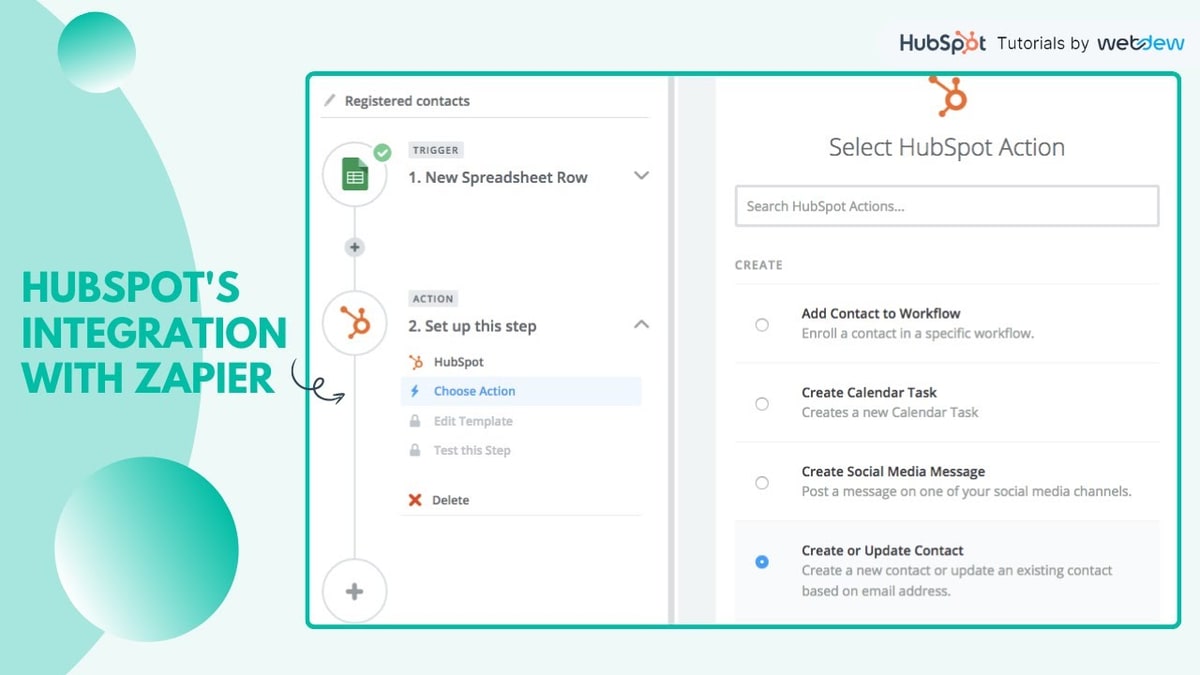
The Zapier HubSpot integration connects HubSpot to over 9,000 apps using automated workflows called Zaps. Each Zap consists of a trigger (an event in one app) and one or more actions (tasks performed in another app). It is available to any HubSpot account, free or paid, and requires a Zapier Professional plan or higher for multi-step workflows.
For related reading, see Zapier Pricing 2026: Plans, Costs, Discounts, and Is It Worth It?.
What Is the Zapier HubSpot Integration?
Zapier connects HubSpot to external tools by listening for changes in HubSpot CRM objects, such as contacts, companies, deals, and tickets, and triggering automated actions in other apps. It also works in reverse: events in external apps can create or update records in HubSpot.
According to HubSpot's knowledge base, Zapier connects HubSpot to over 1,400 apps using triggers and actions. The integration handles contacts, companies, deals, tickets, and custom objects. It requires a Zapier account and, for multi-step Zaps, a paid Zapier plan.
What Are the Main HubSpot Zapier Triggers and Actions?
HubSpot on Zapier supports 15 primary triggers and 14 actions.
Key HubSpot triggers include:
- New Contact Created or Updated
- New Deal Created
- Deal Enters a Specified Stage
- New Company
- New Form Submission
- New Email Event
- New Engagement
- Deal Property Change (Instant)
- New CRM Object Created
Key HubSpot actions include:
- Create or Update Contact
- Create Deal
- Create Company
- Add Contact to List
- Add Contact to Workflow
- Create Engagement
- Create Associations Between Objects
- Create Social Media Message
- Upload File to HubSpot File Manager
Note: some HubSpot triggers and actions require a paid HubSpot plan. These include New Calendar Task, New Email Event, and Create Calendar Task. The Add Contact to List action requires the contact to already exist in HubSpot before it can be added.
What Are the Most Common Zapier HubSpot Workflow Examples?
5 commonly used Zapier HubSpot workflows are:
- Facebook Lead Ads to HubSpot: a new Facebook Lead Ad submission triggers the creation of a new contact in HubSpot, followed by a Slack notification to the sales team
- HubSpot New Deal to Asana Task: when a new deal is created in HubSpot, Zapier creates an assigned task in Asana for the sales team to begin follow-up
- HubSpot Contact to Mailchimp Audience: when a new contact is added to HubSpot, Zapier adds them to a specified Mailchimp audience for email nurturing
- HubSpot Deal Stage to Google Calendar: when a deal enters a specified stage in HubSpot, Zapier creates a follow-up event in Google Calendar
- QuickBooks Paid Invoice to HubSpot Deal: when an invoice is marked paid in QuickBooks, Zapier updates the connected HubSpot deal record to reflect the payment status
Each of these workflows eliminates manual data entry and reduces the risk of contact or deal records falling out of sync across multiple platforms.
How Does Zapier Connect HubSpot to Other CRM Platforms?
Zapier connects HubSpot to other CRM platforms bidirectionally. This allows sales teams to maintain records across multiple CRMs simultaneously or migrate data between them.
What Is the Pipedrive Zapier Integration?
The Pipedrive Zapier integration connects Pipedrive's sales pipeline to thousands of external apps. Pipedrive triggers on Zapier include New Deal Created, Deal Matches a Filter, Lead Created, New Organization, New Activity, and New Note. Pipedrive actions include Create Person, Create Deal, Create Activity, and Create Lead.
A common workflow: when a new lead is created in Pipedrive, Zapier automatically creates a corresponding contact in HubSpot and adds them to a Mailchimp audience. The integration works bidirectionally, so changes in either CRM can flow to the other. Available at zapier.com/apps/pipedrive/integrations.
What Is the Close CRM Zapier Integration?
Close CRM is a sales CRM built for outbound sales teams. Its Zapier integration supports triggers including New Lead Created, New Contact, Lead Status Changed, and Opportunity Status Changed. Actions include Create Lead, Create Contact, and Create Activity.
A common workflow: when a web form is submitted, Zapier creates a new lead in Close CRM and simultaneously adds the contact to HubSpot. This eliminates manual data entry for teams running parallel outbound and inbound pipelines. Available at zapier.com/apps/close/integrations.
How Does Zapier Connect HubSpot to Email and Marketing Tools?
Zapier connects HubSpot to email marketing and social media scheduling platforms. This is one of the most common use cases across all Zapier users.
What Is the Zapier to Mailchimp Integration?
The Zapier Mailchimp integration connects Mailchimp audiences and campaigns to external apps. Mailchimp triggers include New Subscriber, New Campaign Sent, Subscriber Unsubscribed, and Email Opened. Mailchimp actions include Add or Update Subscriber and Create Campaign.
A common workflow: when a new contact is added to HubSpot, Zapier adds them to the relevant Mailchimp audience based on the lead source or lifecycle stage. This keeps email marketing lists current without manual exports. Available at zapier.com/apps/mailchimp/integrations.
What Is the Metricool Zapier Integration?
Metricool is a social media analytics and scheduling platform. Its Zapier integration allows external events to trigger social media posts or analytics reports in Metricool, and for Metricool data to push updates into other apps.
A common workflow: when a new HubSpot deal is closed, Zapier creates a scheduled social media post in Metricool to announce a new client or project. For agencies, this connects CRM milestones to social content calendars automatically. Available at zapier.com/apps/metricool/integrations.
What Is the AdRoll Zapier Integration?
AdRoll is a digital advertising and retargeting platform. Its Zapier integration connects contact and lead data to AdRoll audience lists for retargeting campaigns.
A common workflow: when a new contact is created in HubSpot after a form submission, Zapier adds that contact to an AdRoll audience segment for retargeting ads. This closes the gap between inbound lead capture and paid retargeting, ensuring all new leads are enrolled in ad sequences without manual audience uploads. Available at zapier.com/apps/adroll/integrations.
How Does Zapier Connect HubSpot to Project and Data Management Tools?
Zapier connects HubSpot to project management and database tools, allowing CRM events to trigger task creation and data logging automatically.

What Is the Zapier and Asana Integration?
The Asana Zapier integration connects Asana projects and tasks to external apps. Asana triggers include New Task in Project, Task Completed, and New Project. Asana actions include Create Task, Create Project, and Add Task to Project.
A common workflow: when a new deal is recorded in HubSpot, Zapier creates an assigned task in Asana for the relevant sales team member to begin follow-up. This removes the need for a manager to manually delegate deal follow-up tasks after each new CRM entry. Available at zapier.com/apps/asana/integrations.
What Is the Airtable Zapier Integration?
Airtable is a flexible cloud database with spreadsheet-style views. Its Zapier integration supports triggers including New Record and New or Updated Record, and actions including Create Record and Update Record.
A common workflow: when a new contact is created in HubSpot, Zapier adds a corresponding row in an Airtable base used by operations or finance teams. Airtable can also serve as a trigger, such as when a new row is added to a project tracker, automatically creating a deal or contact in HubSpot. Available at zapier.com/apps/airtable/integrations.
How Does Zapier Connect Industry-Specific Software?
Zapier connects specialist platforms to CRMs, communication tools, and marketing apps. The integrations below cover field services, property management, construction, healthcare, accounting, and communications.
What Is the ServiceTitan Zapier Integration?
ServiceTitan is a cloud-based platform for home services companies, including HVAC, plumbing, electrical, and pest control. Its Zapier integration supports triggers including New Booking, New Job or Project Note, New Call, and New Form Submission. Actions include Create Lead and Create Task.
To use the ServiceTitan Zapier integration, an account on ServiceTitan's The Works or Legacy package is required. The integration also requires ServiceTitan administrator permissions and completion of the ServiceTitan Zapier registration form to obtain a Client ID and Secret Key.
A common workflow: when a new booking is created in ServiceTitan, Zapier sends a Slack notification to the dispatch team and creates a Google Calendar event for the assigned technician. Available at zapier.com/apps/servicetitan/integrations.
What Is the AppFolio Zapier Integration?
AppFolio is property management software for residential and commercial landlords. Its Zapier integration connects property, tenant, and maintenance data to external CRMs and marketing tools.
A common workflow: when a new tenant lease is signed in AppFolio, Zapier creates a contact record in HubSpot and adds them to a Mailchimp welcome sequence for new residents. For property managers, this bridges the gap between lease management and tenant communication without manual data entry. Available at zapier.com/apps/appfolio/integrations.
What Is the Buildertrend Zapier Integration?
Buildertrend is project management software for residential home builders and remodelling contractors. Its Zapier integration connects project creation, lead activity, and scheduling events to external tools.
A common workflow: when a new lead is added in Buildertrend, Zapier creates a deal in HubSpot or Pipedrive for the sales team to manage. This keeps the construction sales pipeline in sync with the broader CRM without requiring manual deal creation after each new inquiry. Available at zapier.com/apps/buildertrend/integrations.
What Is the SimplePractice Zapier Integration?
SimplePractice is practice management software used by therapists, counselors, and health practitioners. Its Zapier integration connects appointment, client, and intake data to external apps.
A common workflow: when a new client is created in SimplePractice, Zapier adds them to a Mailchimp audience or sends a welcome email through Gmail. When an appointment is cancelled, Zapier sends a notification to the practitioner via SMS or Slack. PHI (protected health information) handling should follow HIPAA guidelines when using Zapier with SimplePractice; only non-identifying data should pass through apps that do not have a signed Business Associate Agreement (BAA). Available at zapier.com/apps/simplepractice/integrations.
What Is the TaxDome Zapier Integration?
TaxDome is an all-in-one practice management platform for CPAs, bookkeepers, and accounting firms. Its Zapier integration supports triggers including New Contact Created, Contact Updated, and Contact Deleted. Actions include Create or Update Contact.
A common workflow: when a new client is created in TaxDome, Zapier adds the client to a Google Sheet used for internal tracking and sends a welcome email through Gmail or Mailchimp. TaxDome's Zapier integration is primarily used to avoid double-entry across practice management and communication platforms. Available at zapier.com/apps/taxdome/integrations.
What Is the Dialpad Zapier Integration?
Dialpad is an AI-powered business phone system with calling, messaging, and video conferencing. Its Zapier integration connects call events and contact activity to CRM and project tools.
A common workflow: when a call ends in Dialpad, Zapier creates a call engagement note in HubSpot and logs the call duration and outcome. For sales teams, this eliminates the need to manually log call activity in the CRM after every conversation. Available at zapier.com/apps/dialpad/integrations.
What Is the Click2Mail Zapier Integration?
Click2Mail automates the creation and delivery of physical mail, including postcards, letters, and checks. Its Zapier integration triggers physical mail sends based on events in connected apps.
A common workflow: when a deal is marked as closed-won in HubSpot, Zapier triggers Click2Mail to send a personalized thank-you postcard to the client's mailing address. This combines digital CRM automation with physical direct mail without any manual fulfilment step. Available at zapier.com/apps/click2mail/integrations.
What Is the Dozuki Zapier Integration?
Dozuki is a work instruction and standard operating procedure (SOP) platform for manufacturing and industrial operations. Its Zapier integration connects SOP publishing events and step-completion data to quality management and communication tools.
A common workflow: when a work instruction is published or updated in Dozuki, Zapier sends a Slack notification to the relevant team and creates a task in Asana for the quality review team. For manufacturing operations, this closes the loop between documentation updates and team action without manual communication. Available at zapier.com/apps/dozuki/integrations.
What Is the Practice by Numbers Zapier Integration?
Practice by Numbers is a dental practice analytics platform covering production tracking, patient communication, and performance reporting. Its Zapier integration connects patient and appointment data to external marketing and communication tools.
A common workflow: when a new patient is added in Practice by Numbers, Zapier adds them to a Mailchimp audience for the practice's new patient welcome sequence. For dental practices, this connects patient acquisition data directly to email marketing without manual list exports. Available at zapier.com/apps/practice-by-numbers/integrations.
Does Anytype Have a Zapier Integration?
Anytype does not have a native Zapier integration as of 2026. Anytype is a privacy-first, local-first knowledge management app. It uses a local data model that does not currently support the webhook-based triggers Zapier relies on. Users seeking to connect Anytype to external apps can use Anytype's API or request integration via the Anytype community forum at community.anytype.io.
How Do You Set Up a Zapier Integration?
To set up any Zapier integration, follow these 4 steps:
- Create a Zapier account at zapier.com. New accounts receive a 14-day free trial of the Professional plan.
- Click "Create Zap." Select the trigger app (for example, HubSpot) and the trigger event (for example, New Contact Created).
- Connect the trigger app by authenticating your account credentials. Select the specific trigger conditions.
- Select the action app (for example, Mailchimp) and the action event (for example, Add or Update Subscriber). Map the data fields between the 2 apps and activate the Zap.
Multi-step Zaps, which chain more than one action, require a Zapier Professional plan or higher at $19.99 per month billed annually. The Free plan supports 2-step Zaps (1 trigger and 1 action) only.


Olaitan Oladipo holds a BSc in Sociology from Olabisi Onabanjo University. He is a self-taught automation builder who has spent years inside n8n doing the work that most tutorials skip: debugging OAuth errors at 2am, migrating client automations from Make.com mid-project, fighting reverse proxy misconfigurations on AWS EC2, and figuring out through trial and error what actually holds up in production versus what only looks clean in a demo.
He is not a developer by training and not a SaaS founder. He is the person in the Discord server who actually answers the question instead of linking to the docs.
His writing on n8n Automation Tutorial covers self-hosting, AI agent workflows, tool comparisons, and the security vulnerabilities the automation industry would rather not discuss. He has built AI-assisted invoice approval flows using OpenAI function calling, connected Claude via HTTP Request nodes, and holds considered opinions about Zapier, Make.com, LangChain, and CrewAI that their marketing teams would not appreciate.
He writes for people who are technical enough to follow a tutorial but experienced enough to want the honest version.


