
I was mid-client project when Make‘s CTO dropped the Maia announcement, and I stopped what I was doing to test it. Maia is a conversational AI layer inside the Scenario Builder where you describe a workflow in plain language and it generates the full visual scenario. The demo looks compelling. The thing buried in the release notes does not.
AI-powered workflows in Make now consume three to five times more credits than standard scenarios. Make’s announcement mentioned this as a pricing consideration, but the framing was gentle enough that most coverage glossed over it. At high volume, that multiplier does not stay gentle.
I have been using Make long enough to know how the credit model compounds at scale. A client I migrated to n8n last year was running roughly four hundred scenarios per month before costs became a serious problem. That was before any AI multiplier existed. Three to five times on top of what they were already spending would have moved Make from a tool into a budget conversation.
I built a test scenario using Maia last week, asking it to create a lead enrichment flow from a webhook through three HTTP modules to a CRM. The generated scenario looked correct on inspection and the module sequence was logical. It failed on the third HTTP module because Maia had set the request method as GET for a POST-only endpoint. There was no error flag in the generated output, just a silent wrong choice I had to find by running the scenario.
I ran a simple three-module CRM update triggered by a form submission through Maia as a benchmark for credit consumption. The same scenario built manually consumed standard credits at the expected rate. The Maia-generated version consumed four times that, with overhead appearing in the AI module Make inserts to manage the generated flow. That overhead does not disappear when the scenario runs in production.
To put numbers on this concretely, a ten thousand operation plan becomes two to three thousand effective operations when the AI multiplier applies. That is not a footnote in the pricing FAQ. That is the central economic fact of using Maia at any meaningful volume.
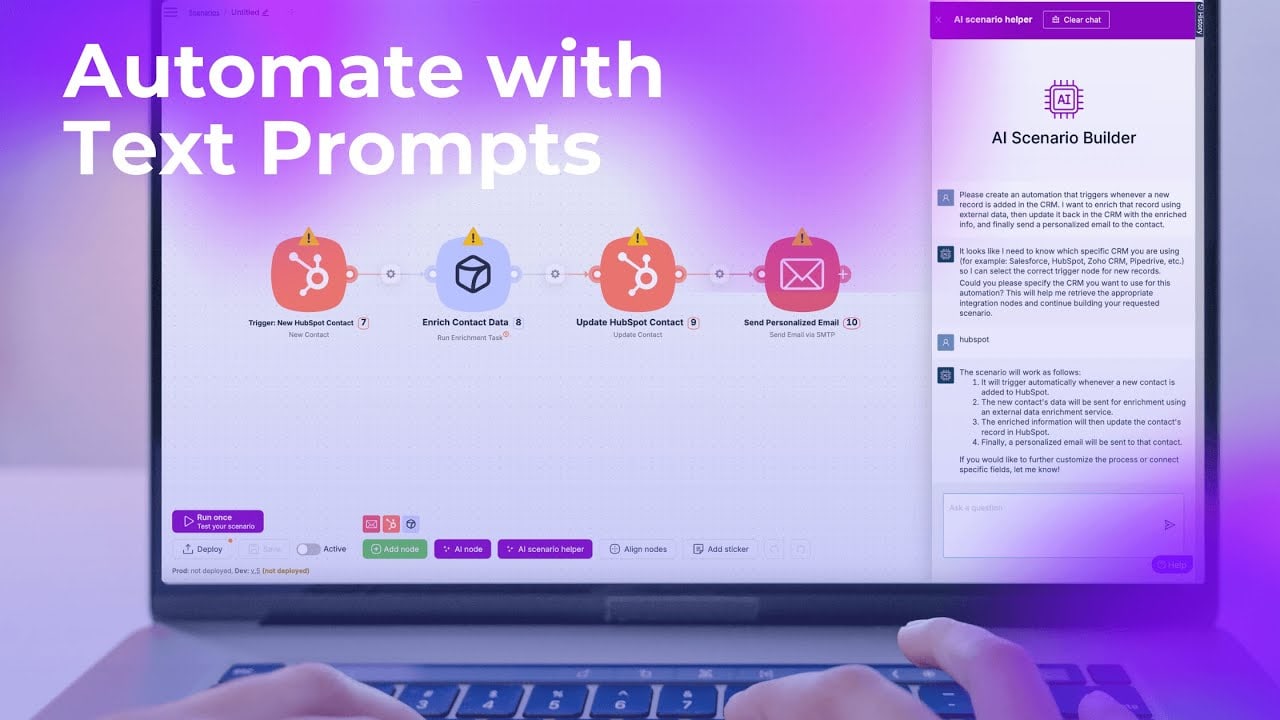
What Maia does well is scaffold a starting point, and it does this faster than I expected. If you know what you need, Maia gets you to sixty percent of a working scenario in roughly sixty seconds. The remaining forty percent, error handling, data mapping edge cases, retry logic, is still yours to build.
The use case where Maia actually earns its overhead is rapid prototyping with clients in the room. You describe the workflow in plain language, Maia generates a visual scenario in seconds, and the client can see something concrete before the meeting ends. That is a real capability the previous Scenario Builder did not offer.
Zapier Copilot does something similar and has the same fundamental problem: AI-generated automation is prototype-quality, not production-quality. Zapier is already expensive enough that adding an AI layer on top of existing task pricing produces sticker shock faster than Maia does. Make’s credit model is more forgiving at low volume, which is why Maia is genuinely interesting for builders still in the exploration phase.
n8n has its own AI-assisted workflow suggestions and they work differently because the underlying architecture is different. n8n’s AI feature helps you find and configure nodes rather than generating a full workflow from scratch. That is a more modest claim and it tends to produce more reliable results because the scope is narrower. Maia is trying to do more, which makes its failure modes more visible when they appear.
The documentation for Maia’s credit consumption is not wrong, but it requires active reading to find the relevant number. The three to five times figure appears in the technical notes section, not in the main feature announcement. Most users will encounter it for the first time when they check their credit balance after a week of Maia-assisted building.
Maia is the most capable AI scenario builder currently available, and the credit multiplier is the most important thing the launch post did not lead with. If you build at volume in Make, test your monthly credit consumption against a Maia-assisted scenario before you commit to it as a standard part of your workflow.

Olaitan Oladipo holds a BSc in Sociology from Olabisi Onabanjo University. He is a self-taught automation builder who has spent years inside n8n doing the work that most tutorials skip: debugging OAuth errors at 2am, migrating client automations from Make.com mid-project, fighting reverse proxy misconfigurations on AWS EC2, and figuring out through trial and error what actually holds up in production versus what only looks clean in a demo.
He is not a developer by training and not a SaaS founder. He is the person in the Discord server who actually answers the question instead of linking to the docs.
His writing on n8n Automation Tutorial covers self-hosting, AI agent workflows, tool comparisons, and the security vulnerabilities the automation industry would rather not discuss. He has built AI-assisted invoice approval flows using OpenAI function calling, connected Claude via HTTP Request nodes, and holds considered opinions about Zapier, Make.com, LangChain, and CrewAI that their marketing teams would not appreciate.
He writes for people who are technical enough to follow a tutorial but experienced enough to want the honest version.